
What a Digital Menu for Restaurants Actually Is
A digital menu for restaurants is a live, mobile-friendly version of your menu that guests open on their phones. In most dining rooms, guests access it by scanning a QR code on the table, at the counter, in the window, or on a printed card. The important part is that the menu is not locked inside a file. It is a web page your team can update whenever prices, items, photos, allergens, or translations change.
That difference matters more than it sounds.
A PDF menu can technically be "digital," but it often behaves like a printed menu squeezed onto a phone screen. Guests pinch, zoom, rotate the screen, and hunt through tiny text. Staff still deal with outdated prices because someone has to edit the design file, export a new PDF, upload it, and check that every QR code points to the latest version. A proper digital menu removes that friction. It is built for the way guests actually browse at the table: one hand, small screen, low patience, and a decision to make.
For a restaurant owner, a digital menu is less about looking modern and more about control. If the lunch special sells out at 13:15, you can hide it before another table orders it. If wine prices change after a supplier update, you can adjust them without sending artwork to a printer. If tourists keep asking the same questions about ingredients, you can add clearer descriptions or translations once and let the menu help every shift after that.
Menuit is designed around that practical reality: upload the menu you already have, turn it into a live digital menu, generate a QR code, and keep improving it without rebuilding the whole thing from scratch.
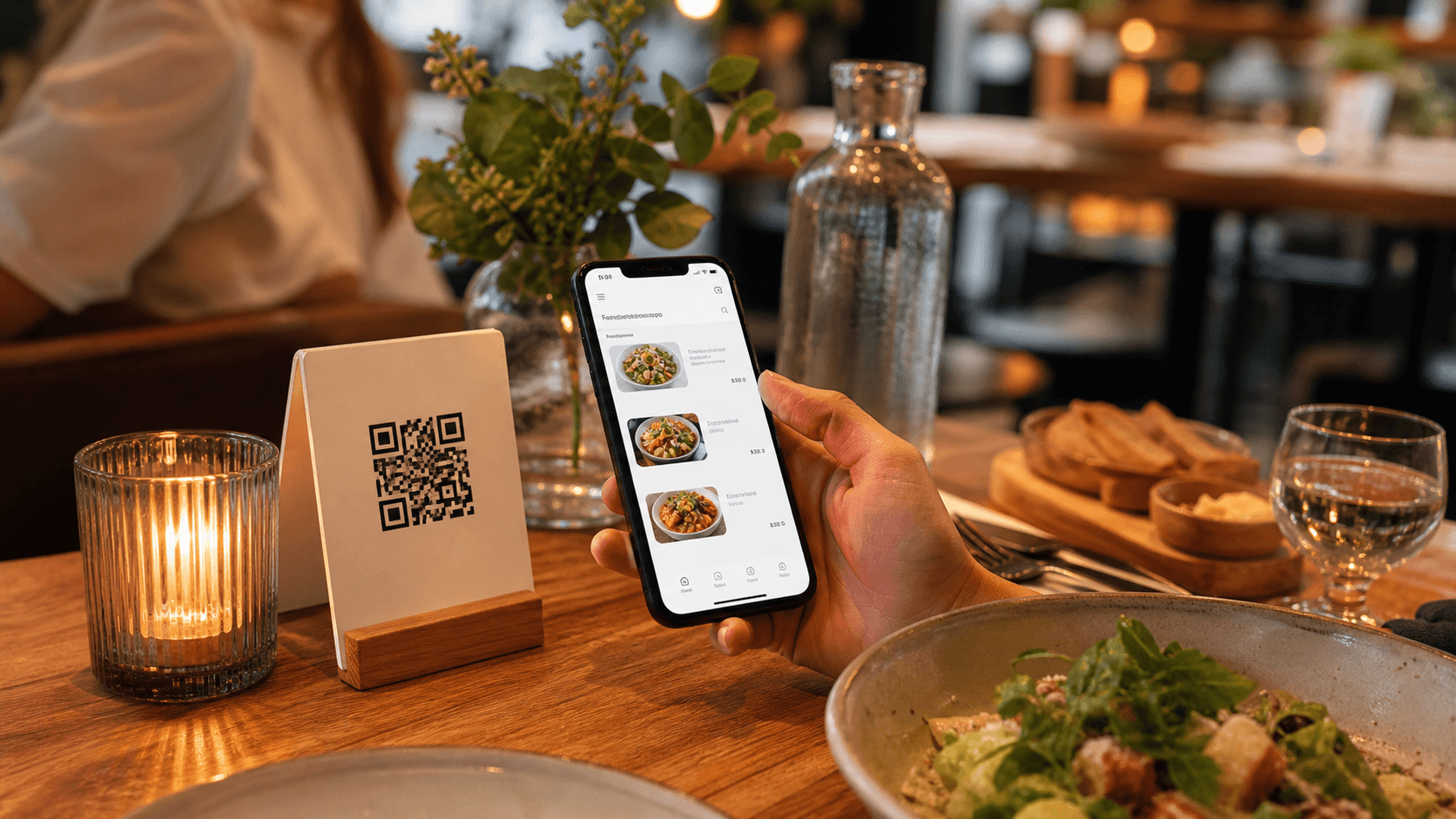
How a QR Code Menu Works in a Restaurant
The guest experience is simple. A guest sits down, opens the camera on their phone, scans the QR code, and taps the link that appears. The menu opens in the browser. No app download, no account, no login, no waiting for staff to bring a separate menu.
Behind the scenes, the QR code points to a stable menu URL. That stability is important. You do not want to print new QR codes every time you change the menu. The QR code should stay the same while the content behind it changes. That way, your table tents, stickers, counter cards, and window signs keep working even when the kitchen updates the dishes.
Good QR placement depends on the type of service:
- A full-service restaurant can place table tents near the salt, water glasses, or candle so the code is visible before the waiter arrives.
- A cafe can put a QR code near the till so guests can browse pastries, drinks, and add-ons while waiting in line.
- A bar can place QR codes on high tables, beer mats, and wall signs so guests can check cocktails without crowding the counter.
- A hotel restaurant can add QR codes in rooms, elevators, and lobby areas to promote breakfast, room service, or happy hour.
- A takeaway restaurant can print the code on delivery inserts so customers can return to the live menu later.
The scan is only the first step. The real test is what happens after the menu opens. It should load quickly, fit the phone screen, organize dishes into clear categories, and make it easy to find prices, ingredients, allergens, photos, and language options. A QR code is useful only if the page behind it helps guests order with less confusion.
Why Restaurants Switch from Printed and PDF Menus
Printed menus still have their place. A tasting menu, a wine list for a fine-dining room, or a beautifully designed menu for a special occasion can be part of the atmosphere. The issue is that everyday menu management has become too changeable for print alone.
Ingredient costs move. Seasonal items come and go. Staff need to communicate sold-out dishes quickly. Owners need to protect margins without turning every price adjustment into a design and printing project. When every update requires a reprint, small changes get delayed. That delay shows up in awkward ways: servers apologizing for unavailable dishes, guests seeing old prices, or managers using stickers and handwritten notes to patch the problem during service.
PDF menus solved part of the problem because they were easy to upload, but they created another one. A PDF is usually designed for paper, not a phone. Guests have to zoom into categories, slide left and right, and remember where they saw a dish. For someone standing outside your restaurant deciding whether to come in, that friction can be enough to lose the visit.
We go deeper into that problem in Why Restaurants are Moving Away from PDF Menus (And Guests Love It). The short version is this: a web-native digital menu is easier for guests to read, easier for owners to update, and easier for search engines to understand than a static PDF file.
Search visibility is another overlooked reason to switch. If your menu exists as structured text on a web page, dishes, categories, and descriptions have a better chance of being understood by search engines. That matters when someone nearby searches for "gluten-free brunch," "seafood pasta near me," or "cocktail bar with snacks." Your menu content should not be buried in a file that is hard to read on mobile. For the practical SEO checklist, read Why Digital Menus Improve Restaurant SEO.
Benefits for Restaurant Owners
The biggest benefit is speed. A digital menu gives owners and managers the ability to make operational changes at the pace of the restaurant.
Imagine the kitchen runs out of burrata at 20:10 on a Friday. With a printed menu, the item stays visible and the server has to explain it at every table. With a digital menu, the item can be hidden or marked unavailable before the next guest scans. That small update saves staff time, avoids disappointment, and keeps the dining experience cleaner.
The same logic applies to prices. Supplier increases are not theoretical. They show up in invoices for olive oil, meat, seafood, dairy, coffee, and packaging. If you wait until the next print run to adjust prices, you may spend weeks selling dishes at weaker margins. A digital menu lets you respond when needed, not when the printer schedule allows. For more on that operational pain point, read Handling Price Volatility Without the Constant Reprint Headache.
Digital menus also make specials easier to manage. A chef can test a seasonal dish for one weekend without committing to a new printed insert. A bar can feature a cocktail during happy hour and remove it when the promotion ends. A cafe can promote a pastry that needs to move today, then replace it tomorrow. This gives owners a simple way to learn what sells before making bigger menu decisions.
There is also a staff benefit. Front-of-house teams answer fewer repetitive questions when the menu explains ingredients clearly. Kitchen teams get fewer orders for unavailable items. Managers spend less time chasing down old menu versions across tables, websites, Google profiles, delivery inserts, and social links. The menu becomes one reliable source of truth.
Finally, a digital menu supports multilingual service without printing several versions. If your restaurant serves tourists, that can directly affect revenue. Guests who understand the menu are more likely to order the signature dish, add a starter, choose a wine, or try dessert instead of defaulting to the safest familiar option. We explain that in more detail in Speaking Your Guests' Language: How to Increase Average Order Values.
Benefits for Guests
Guests do not care whether a menu system is clever. They care whether it helps them decide what to order.
A good digital menu makes that decision easier. It opens quickly. It is readable without zooming. Categories are clear. Prices are visible. Descriptions explain the difference between similar dishes. Photos help guests understand portion style or presentation. Allergens and dietary notes are easier to find. Language options help international guests order with confidence.
This is especially useful during busy periods. When a table can browse immediately, they are not waiting for a physical menu to arrive. By the time the server comes over, guests may already know what they want. That can shorten ordering time without making the experience feel rushed.
Digital menus also help guests discover more of the menu. On paper, many people scan quickly and settle on a familiar dish. On a phone, a well-structured menu can highlight chef recommendations, popular items, new dishes, pairings, or limited-time specials. This is not about pushing guests aggressively. It is about giving the right dishes enough visibility.
For guests with dietary needs, clarity matters. A short note like "contains nuts," "gluten-free option available," or "ask for vegan preparation" can prevent long back-and-forth explanations. For tourists, translated ingredient descriptions can remove the fear of ordering the wrong thing. For families, clear categories and photos can make ordering faster when children are impatient.
The best digital menu feels calm. It does not make guests work to understand the restaurant.
How Menuit Fits Into the Workflow
Many restaurant owners hesitate because they imagine a digital menu project will mean typing every item manually. That is exactly the kind of work Menuit is built to reduce.
With Menuit, you can start from the menu you already have. Upload a PDF, Word document, Excel file, or even a photo of a printed menu. Menuit uses AI to extract the structure: restaurant details, categories, item names, descriptions, and prices. From there, you can review the content, clean up anything that needs adjustment, add branding, and publish.
The workflow is straightforward:
- Upload your existing menu.
- Review the extracted categories, dishes, descriptions, and prices.
- Add your logo, colors, and restaurant details.
- Translate the menu for the languages your guests actually need.
- Generate a QR code.
- Print the QR code once and place it where guests will scan.
- Update the menu whenever something changes.
This workflow is useful for new restaurants, but it is also useful for established teams with messy menu history. Many restaurants have one menu in a PDF, another version in a spreadsheet, specials in a WhatsApp message, and translations in a separate document. Menuit helps bring that content into one live menu that can be maintained from the dashboard.
The goal is not to replace hospitality with software. The goal is to remove the low-value admin work around the menu so staff can spend more time on the guest experience.
What to Include Before You Publish
Before putting QR codes on tables, take a few minutes to check the basics. A digital menu does not need to be perfect on day one, but it should be clear and trustworthy.
Start with category structure. Guests should not have to guess where to find starters, mains, drinks, desserts, brunch, kids' items, or set menus. If your menu is long, keep categories short and logical.
Next, check item names and prices. This sounds obvious, but it is where small mistakes create the most service friction. Make sure the public menu matches what your staff and point-of-sale system expect.
Then improve descriptions where they influence the order. Not every item needs a paragraph. A simple coffee menu may only need names and prices. But signature dishes, unfamiliar regional items, premium cuts, cocktails, and tasting menus deserve enough detail to make the value clear.
Add allergens and dietary notes where possible. Even basic indicators can help guests ask better questions. If your team cannot guarantee a dietary claim, phrase it carefully and invite guests to confirm with staff.
Finally, test the menu like a guest. Scan the QR code from a table. Open it on a phone with mobile data, not only on office Wi-Fi. Check whether the menu loads quickly, whether the text is readable, whether categories are easy to tap, and whether a first-time guest can understand what makes your restaurant worth ordering from.
Common Objections and FAQ
Do guests need to download an app?
No. A proper QR code menu opens in the phone browser. Guests scan the code with the camera and view the menu immediately.
What if some guests still want a paper menu?
You can keep a small number of printed menus available. Many restaurants use both: QR codes for most guests and printed menus for anyone who prefers them. The digital menu still gives your team faster updates and a reliable online version.
Is uploading a PDF enough?
It is better than having no online menu, but it is not the same as a web-native digital menu. PDFs are harder to read on phones, slower to update, and less useful for structured menu content. A live menu page gives guests a smoother experience.
Can I change prices during service?
Yes, but use judgment. Digital menus make updates easy, which is useful for correcting mistakes, removing sold-out items, adjusting market-price dishes, or changing specials. For guest trust, avoid confusing changes while a table is already ordering unless staff are aligned and the reason is clear.
Can a digital menu match my restaurant brand?
It should. A digital menu should feel like part of the restaurant, not a generic template. Add your logo, colors, photos, tone of voice, and the practical details guests need: address, phone, website, and social links.
How long does setup take?
If your existing menu is organized, you can create a first version quickly. The most important work is reviewing the extracted content, checking prices, and making sure categories make sense. After that, improvements can happen gradually.
What should I link from my website and social profiles?
Link to the live digital menu, not an old PDF. Use the same menu link on your website, Google profile, Instagram bio, delivery inserts, and QR code cards so guests always reach the current version.
Why Adopt a Digital Menu Now?
Restaurants are already operating with tight margins, changing costs, and guests who expect information quickly. A digital menu helps with all three. It reduces the cost and delay of reprints. It gives guests a better mobile experience. It helps staff avoid repeated explanations. It lets owners keep prices, items, translations, and specials accurate without turning every change into a project.
The easiest way to start is not to redesign everything. Start with the menu you already use. Upload it, turn it into a clean mobile menu, generate a QR code, and test it in one part of the restaurant. Watch what guests ask about. See which descriptions need work. Add translations where they matter. Improve photos for high-margin dishes. The menu becomes a living tool instead of a static document.
If you want a practical first step, create your first digital menu with Menuit. Upload your existing menu, review the AI extraction, publish your QR code, and keep every future update under your control.